Haryana Engineering Works is widely known as HEW Portal, which is a really important platform for contractors, suppliers and businesses. Especially those who are looking to participate in government related projects and tender opportunities in India. If you have been looking for the contactor registration or login process, then this guide would be helpful for you. As we have covered everything about the HEW Portal, along with the HEW tenders participation process and the document requirements. So without waiting any longer, lets get into it!
What is HEW Portal?
HEW stands for Haryana Engineering Works. It is an online government tender and contractor management platform that is used in Haryana for handling e tendering activities digitally.
The main purpose of this portal is to help contractors register, check active tenders, submit bids online, and track project updates without needing to visit the department physically.
This platform is connected with the broader E tender haryana ecosystem, where multiple departments release tenders for industries-
- Construction
- Engineering
- Infrastructure
- Maintenance
- Supply work
- Service related projects.
HEW portal tenders allow contractors –
- Register as approved contractors
- Access live government tenders
- Submit bids online
- Upload technical and financial documents
- Check bids status
- Track awarded tenders
- Download tender notices and BOQ files.
So, it basically enhances transparency, reduces paperwork, and speeds up the procurement process.
Read more: How to Use HEW Portal: A Simple Step-by-Step Guide for First-Time Users | TenderShark
Why is the HEW Portal Important for Contractors?
Most Haryana Government Departments prefer online procurement systems. Without completing the HEW portal contractor registration, a contractor may not be eligible to participate in government projects. It offers several benefits-
Easy Online Registration
The platform allows contractors to complete the registration process digitally by uploading the required documents and certificates.
Access to HEW Portal Live Tender
Through the HEW portal, you (users) can regularly check newly released Haryana tenders from various Haryana Departments.
Faster Tender Submission
Next, HEW provide e bidding process which reduces the manual paperwork that completely saving your time.
Transparent Tendering Process
The best part, from bid submission to result declaration, every step is followed digitally, which means there is no confusion that improves transparency.
Tender Status Tracking
In this platform, you can check the tender status by using the “HEWP tender status check” feature. So you can monitor your application and bid progress online.
What are the Documents Required for HEW Portal Registration?
Before registering for the HEW portal, you must keep all the documents ready in digital formats. In case you miss or submit incorrect documents, your application will be rejected.
So, here are the following documents required-
- PAN Card
- Aadhaar Card
- GST Registration Certificate
- Firm Registration Certificate
- Experience Certificates
- Bank Account Details
- Income Tax Returns
- Passport Size Photograph
- Digital Signature Certificate (DSC)
- Address Proof
- Affidavit or declaration forms
NOTE: Every department may ask for additional documents depending on the tender category.
What are the steps for HEW Portal Contractor Registration?
Here are the following steps to register on the HEW portal as a contractor-
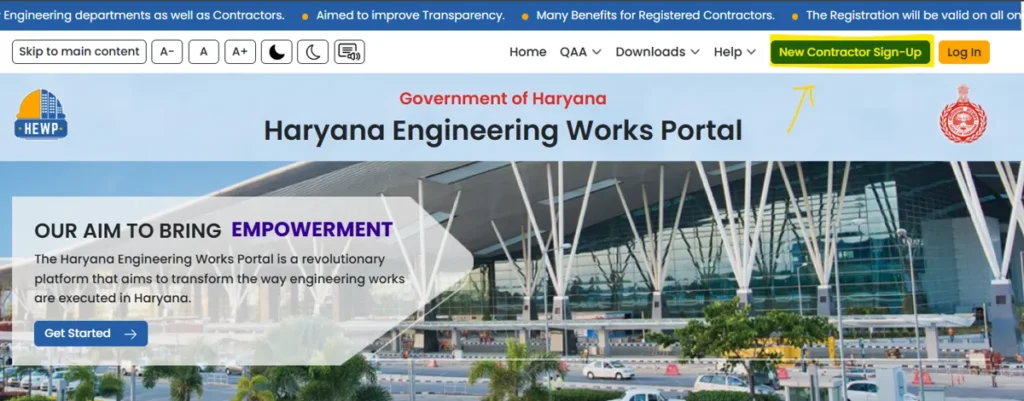
Step 1: Visit the Official HEW Portal
Firstly, go to the official HEW portal Haryana login page through the government etender website. Haryana Engineering Works Portal
Step 2: Contractor Registration
On the homepage, you can see the “New Contractor Sign Up” option. Click on that.
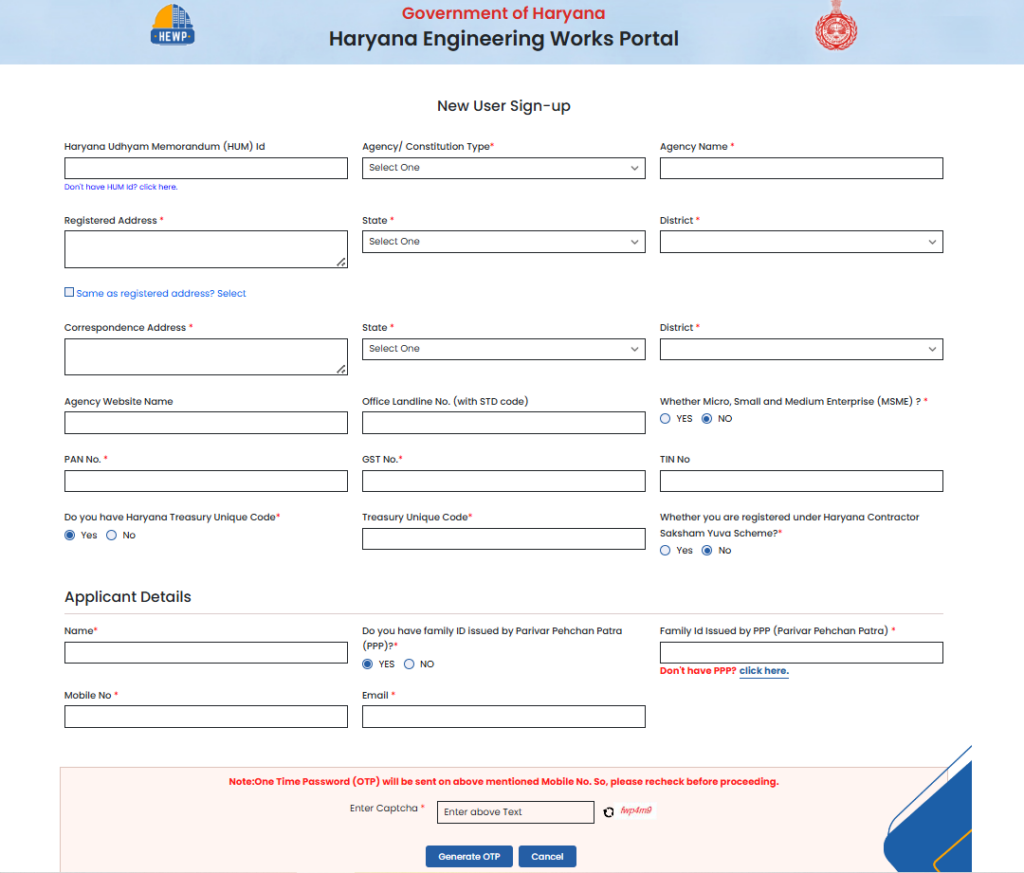
Step 3: Fill Basic Information
Next, you will require to enter details just like mention in the below screenshot-
Step 4: Upload Required Documents
You will need to provide scanned copies of important certificates and documents for the registration approval.
Step 5: Create Login Credentials
Once you have successfully registered on the HEW portal, you can create a username and password for future HEW portal login access.
Step 6: Verification and Approval
Lastly, the department will review your application, submitted details and documents. Once approved, your account will be active for tender participation.
Importance of Digital Signature Certificate (DSC)
A digital signature certificate is mandatory for participating in most E tender Haryana projects. You can use DSC for secure online bid submission and document authentication.
If you have no DSC registration, you may not be able to submit bids successfully on the HEW Portal Tender system.
Generally, government e tender participation needs a Class 3 DSC.
How to Login on HEW Portal Haryana? – Steps to Follow
The following are the steps for HEW portal login-
- Open the official portal
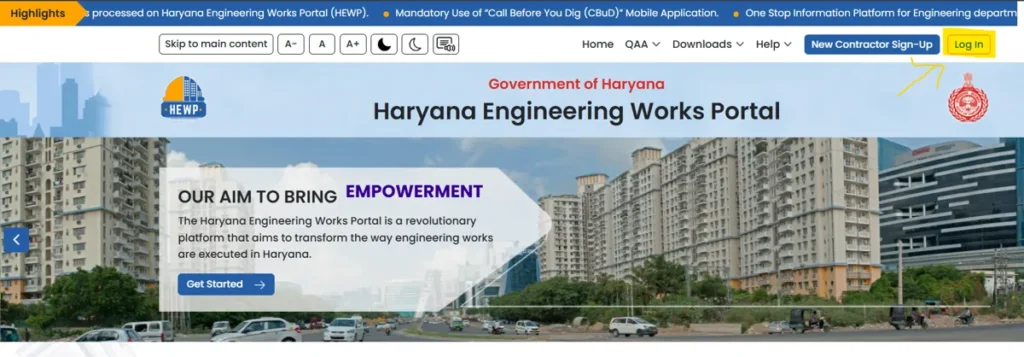
- Enter registered username
- Enter password
- Complete captcha verification
- Click login
Once logged in, contractors can access tender notices, application history, payment details, and live bidding opportunities.
How to Check the HEW Portal Live Tender
One of the most useful features is the HEW Portal Live Tender section, where contractors can view currently active tenders released by Haryana departments.
Users can filter tenders based on:
- Department name
- Tender category
- District
- Tender value
- Submission deadline
- Project type
Before applying, contractors should carefully read the tender notice, eligibility conditions, technical requirements, and submission deadlines.
How to Apply for Tender on HEW Portal
The online bid submission process is simple once registration and DSC setup are completed.
Select the Tender
Choose the relevant tender from the HEWP Live Tender login dashboard.
Download Tender Documents
Download NIT, BOQ, technical specifications, and eligibility documents.
Prepare Technical Bid
Upload all required technical documents, certificates, and experience proofs.
Fill Financial Bid
Enter quotation or financial rates carefully according to the tender instructions.
Submit Bid Online
Use the Digital Signature Certificate to verify and submit the application successfully.
After a successful submission, contractors usually receive acknowledgment or reference details for future tracking.
HEWP Tender Status Check Process
After applying for a tender, users can track progress through the HEWP Tender Status Check feature.
This section allows contractors to check:
- Bid submission confirmation
- Technical bid status
- Financial bid updates
- Tender opening details
- Qualification results
- Award notifications
Regularly checking the status helps contractors stay updated regarding approvals and corrections.
Common Issues During HEW Portal Registration
Many first-time users face small technical or document-related issues while using the portal. Some common problems include:
Invalid DSC Error
This usually happens when the Digital Signature Certificate has expired or is improperly configured.
Document Upload Failure
Large file sizes or unsupported formats may cause upload errors.
Incorrect GST or PAN Details
A mismatch in business information may delay verification.
Login Problems
Forgotten passwords or browser compatibility issues can affect HEW Portal Haryana login access.
Tender Submission Timeout
Slow internet connection during the final submission may interrupt the bidding process.
To avoid problems, contractors should complete submissions well before deadlines.
Tips for Successful Tender Application
Applying strategically increases the chances of qualification and approval.
- Carefully read the eligibility conditions before applying
- Keep all registration documents updated
- Renew DSC before expiry
- Avoid last-minute tender submission
- Double-check BOQ entries
- Ensure technical documents are properly scanned and visible
- Monitor the HEW Portal Live Tender updates regularly
Difference Between HEW Portal and E Tender Haryana
Many users confuse both terms because they are interconnected.
The E Tender Haryana system is the broader online tendering infrastructure used by Haryana government departments, while the HEW Portal mainly focuses on contractor services, registrations, and tender participation workflows.
Both systems work together to manage government procurement digitally.
Is HEW Portal Safe for Online Tender Submission?
Yes, the portal follows secure digital tendering procedures. Features like encrypted login systems, Digital Signature Certificates, and online verification help maintain transparency and security during bidding.
However, contractors should always:
- Use official websites only
- Avoid sharing login credentials
- Update passwords regularly
- Keep DSC devices secure
How Does Tendershark Help?
Tendershark is a reliable and dedicated platform to get tender details, active tenders and eprocurement. Here, you can explore the active tender list on a daily basis and get notified if new tender releases. The best part, you can search tenders unlimitedly without any platform fee. Even, you can ease your search by simply filtering with Authority, Keywords, State and locality. So, without any delays, browse Tendershark today.
Final Words
The Haryana Engineering Works portal is a really crucial platform that every contractor, supplier, and businesses who wants to work in government projects. If you are planning to participate in HEW projects in 2026, then this guide is completely for you. Here in this portal, users get several benefits along with the opportunities.
Frequently Asked Questions – FAQs
Q. What is the HEW helpline number?
Ans. Contact number- 1860 180 2065, and info-hewp.pwd@hry.gov.in.
Q. What type of tenders are released by the HEW portal?
Ans. You can find the tenders, including civil, public procurement and infrastructural engineering.
Q. Who is eligible for HEWP Haryana support?
Ans. Any indian individual, partnership firm, limited liability partnership (LLP) or public and private limited company.
Q. How to check tender status on the Hew portal?
Ans. You can check the tender status on the Hew portal by using the tender ID or logging in to your contractor/employee dashboard.