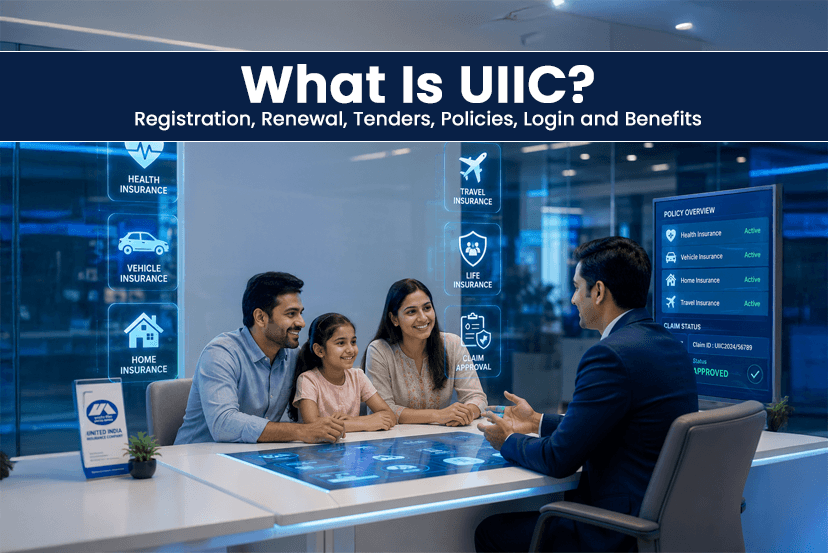
The digital platform has become essential for every sector now to maintain transparency, convenience and a less time consuming process. One of the sectors is Insurance in India. And the most trusted public sector insurance offer in the country is United India Insurance Company Limited (UIIC). The company offers a wide range of insurance products, including health insurance, motor insurance, travel insurance, crop insurance, property insurance and commercial solutions.
Nowadays, users can access almost every insurance related service through the UIIC portal. From policy purchase, premium payment, UIIC renewal, claim tracking, policy download, or tender participation. However, many beginners get confused about the UIIC portal registration, renewal and more things. So, in this guide, we have covered everything for you. From the portal, login procedures, insurance tender information and customer support. Read more!
What is UIIC?
United India Insurance Company Limited is one of the trusted government owned general insurance companies. The UIIC was established in 1938 and nationalized in 1972, the company works under the ownership of the Government of India. UIIC offers insurance services to individuals, businesses, MSMEs, industries, and government organizations nationwide.
UIIC company offers multiple insurance categories, including-
- Health Insurance
- Vehicle Insurance
- Travel Insurance
- Fire Insurance
- Marine Insurance
- Crop Insurance
- Industrial Insurance
- Personal Accident Insurance
The main purpose of the UIIC is to offer affordable insurance coverage with the wide accessibility across urban and rural India.
How to Register on the UIIC Portal – Step By Step Process
There are a few steps that you need to go through to register yourself on UIIC portal-
Step 1: Visit the Official UIIC Portal
Go to the official UIIC website or directly click on this link – https://uiic.co.in/web/
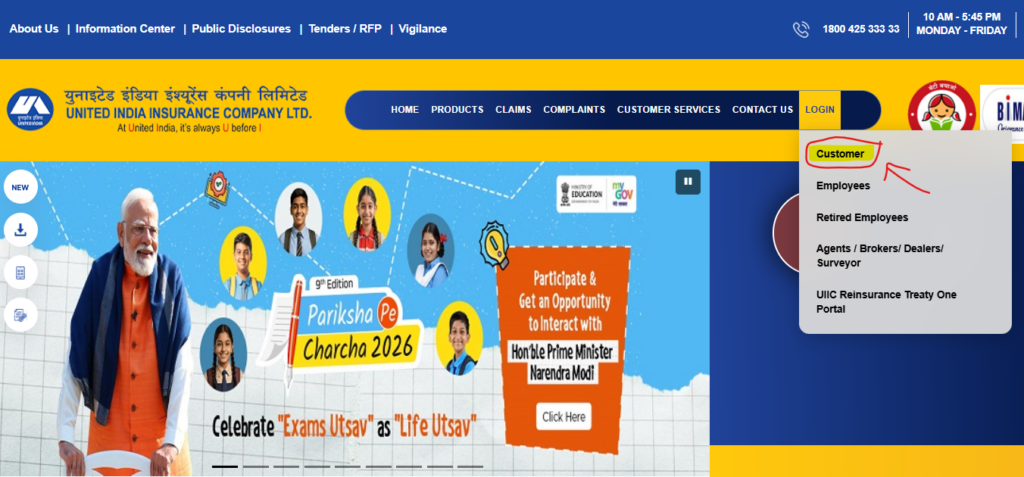
A- Click on the login section and select “Customer.”
Step 2: Select New User Registration
After clicking on the customer, you will be directed to another page to log in. In the below section, you will see the “New Customer? Register Here” link. Select that.
Step 3: Enter Policy Details
Users need to provide the details, including- name, mobile number, email Id and Captcha.
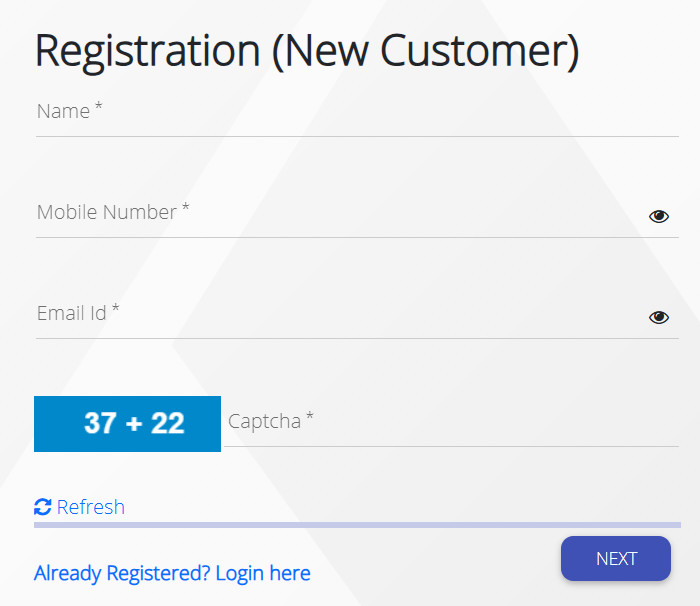
Step 4: Verify OTP
You will get the OTP via your Mobile Number or Email. Verify it.
Step 5: Create Login Credentials
Once the verification is completed, you can create a username and password for future login access.
How to Log in to the UIIC?
There is simple steps to log in to the UIIC portal-
- Visit the official Uiic Portal home page.
- Click on the login section.
- Enter username and password.
- Complete captcha verification if required.
- Click on Login.
Types of Policies Offered by UIIC
The following are several UIIC policies that customers can opt for-
Health Insurance
UIIC offers individual and family health insurance plans that cover hospitalization, medical treatment, surgeries and critical illness.
Motor Insurance
The company offers two-wheeler and car insurance with third-party and comprehensive coverage options.
Travel Insurance
Travel insurance policies cover medical emergencies, baggage loss, trip cancellations, and international travel risks.
Business Insurance
Commercial insurance solutions are available for industries, warehouses, offices, factories, and MSMEs.
Crop and Rural Insurance
UIIC also supports rural and agricultural insurance services for farmers and agricultural businesses.
Step by Step UIIC Renewal Process Online
By following the steps mentioned below, users can easily renew on the UIIC portal without any policy interruption.
Step 1: Log in to the UIIC Portal
First, you need to log in to the UIIC portal through your customer account.
Step 2: Select Existing Policy
Now, select the policy you want to renew.
Step 3: Verify Policy Information
After that, review the insured details, premium amount, and coverage period. Make sure to do it carefully.
Step 4: Make Online Payment
Now you need to pay for the renewal through- UPI, Debit Card, Credit Card, and Net Banking.
Step 5: Download Renewed Policy
Once the payment is completed, the renewed policy becomes available for download instantly.
NOTE: If you renew UIIC timely, it will help you avoid policy lapses and ensure continued insurance coverage.
What is UIIC Tender?
The UIIC tender section is designed for the vendors, contractors, supplies and service providers that are interested in working with UIIC on official projects and procurement activities.
United India Insurance Company Ltd. regularly publishes tenders related to-
- IT infrastructure
- Security services
- Office maintenance
- Software solutions
- Insurance-related operational services
- Printing and logistics
How to Apply for UIIC Tender- Stepwise Process
Here are the steps that interested applicants usually need to follow-
- Register on the procurement portal of UIIC via UIIC enivida.
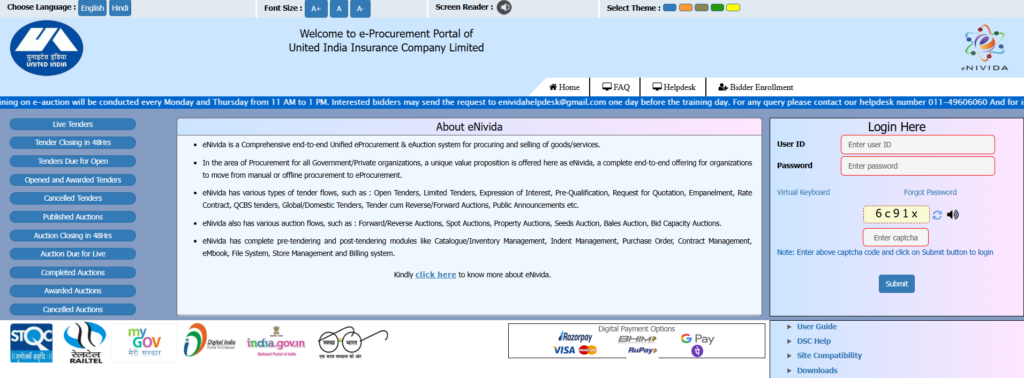
- Download the tender documents
- Submit EMD if required
- Upload technical and financial bids.
- Complete submission before the deadline.
Note: Always read the tender document carefully and review the eligibility criteria, tender specifications and documentation requirements before applying.
How to Claim on UIIC Portal?
So many people get confused over the claiming process, it offered by the insurance company. UIIC offers online and offline claim support for policyholders.
General Claim Process
Claim Intimation
Firstly, users must inform the company regarding the incident or medical emergency.
Document Submission
You may need to provide a document including-
- Policy document
- Medical bills
- FIR copy (if needed)
- Vehicle damage photos
- Claim form.
Verification
Now, the company needs to verify the policy coverage and submit documents.
Claim Settlement
Once your request is approved, the claim amount is processed according to the policy terms and conditions.
TIP: Always try to submit documents and accurate information to speed up the claim process.
Top Advantages of Using the UIIC Services
The UIIC remains one of the trusted public insurance offer various benefits-
Wide Insurance Coverage: UIIC offers insurance solutions for individuals, businesses, vehicles, health and agriculture.
Government Owned Trust: Since this is a trusted government public sector that provides reliability and trust among policyholders.
Digital Services: It offers a wide range of services that are available digitally, including the UIIC portal, UIIC app, and online policy management system that eases insurance handling.
Easy Renewal Process: The website includes an easy renewal process that allows users to renew policies quickly online.
Nationwide Accessibility: Being the government owned insurance company, it is widely available across the nation, from urban to rural customers.
Multiple Policy Options: The best part is that users can choose insurance plans based on their budget, coverage needs, and businesses.
How Tendershark Helps?
Tendershark is the reliable tender search platform that ensures easy and quick searches across India. On our platform, users can search free of cost without cost. Whether you are looking for and more. You can see the most active and up to date tenders. Since we have a system that shows the most recent DMRC, CPWD, CPPP, JKTenders, MPTenders, etc. updates. Explore now!
Sum Up
United India Insurance Company Limited is a trusted and genuine name in the Indian insurance sector. This ensures a simple process, wide services, and digital convenience for customers across the nation. Whether you are looking for health insurance, motor insurance, business coverage or policy management services. We have covered everything about the UIIC portal, registration, renewal and more. For more such details, stay connected with us!