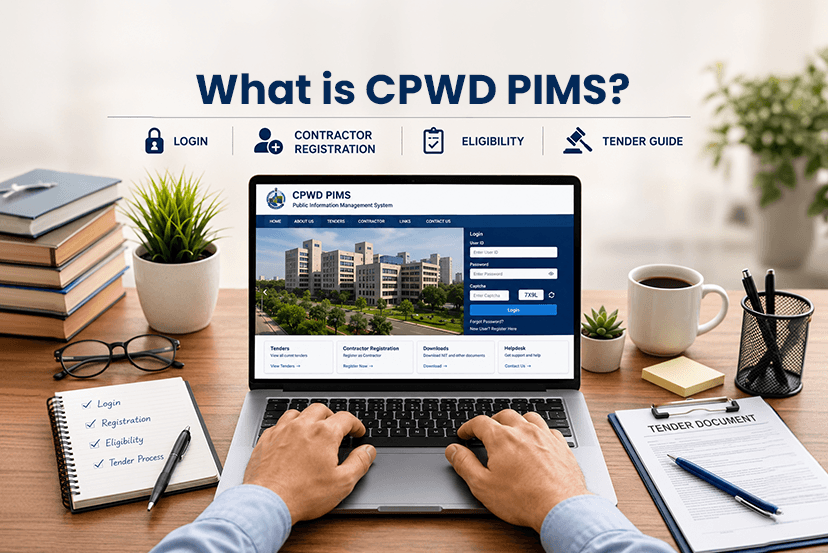
The Central Public Works Department has its official portal, which is CPWD PIMS ( Personal Information Management System), which is specifically made for employees and contractors. In this portal, you get access to employee information, check official orders, and manage tenders. If you are using a CPWD PIMS portal for the first time so understanding the system properly can save both time and effort.
Whether you are looking for the login, employee, orders, tenders and more details, so you will get to know everything about in this blog. From salary and posting details to project management and tender updates, the portal offers multiple services under one digital platform.
What is CPWD PIMS?
The CPWD PIMS portal is an online management system that was developed for the Central Public Works Department. Personnel Information Management System stores and manages employee related records and departmental information digitally.
Now employees can access the
- Personal records
- Transfer details
- Service history
- Posting information
- Other departmental updates
The CPWD itself is one of the oldest and most important government construction agencies in India. It handles the construction and maintenance of government buildings, roads, offices, residential quarters and public infrastructure projects across the country.
It increases the CPWD portal has an essential platform for employees, engineers, contractors and officials.
Read more: BMVM 2.0 Scheme: Bihar Mahadalit Vikas Mission, Eligibility and Registration | TenderShark
How to Login CPWD PIMS – Step By Step Process
By following these steps your will be quickly logged in to the CPWD PIMS-
Step 1: Visit the Official CPWD Portal
Go to the CPWD official website CPWD, through your browser.
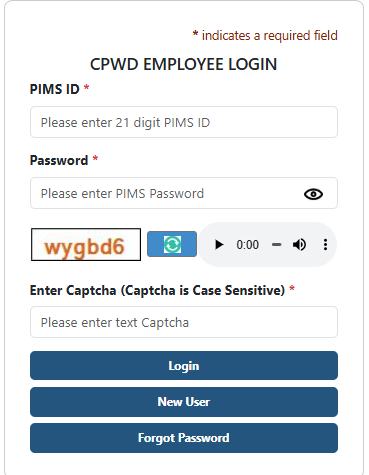
Step 2: Enter Login Credentials
Now, enter your official user ID and password provided by the department. Employees usually receive login credentials through their administrative office.
Step 3: Complete Verification
Some users may need to complete CAPTCHA verification or OTP authentication for additional security.
Step 4: Access Dashboard
Lastly, you will be successfully login to your account and have access to the dashboard.
What to do if Forgot Password?
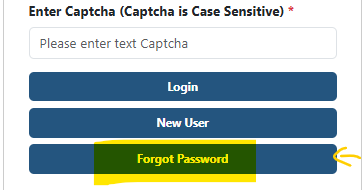
- If you forget your password, you need to follow the same login process. In the section below, click on “Forgot Password.”
- Next, you will be directed to another page, where you need to select the recovery method “By email ID” or “By Mobile Number.”
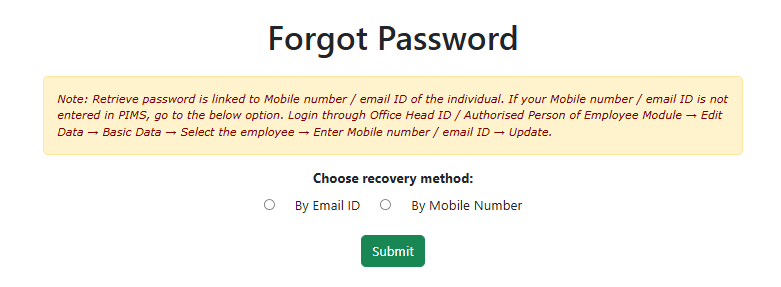
NOTE: In case you cannot log in from this method, you can contact the department IT Support team.
How to Register on CPWD PIMS – First Time Users Guide
The following are the steps that every new user needs to follow for registering on CPWD PIMS-
STEP 1
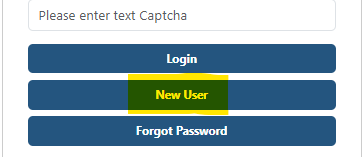
Go to the official site of CPWD PIMS, and on the login section, you will see the “New Users” column, click on that.
STEP 2
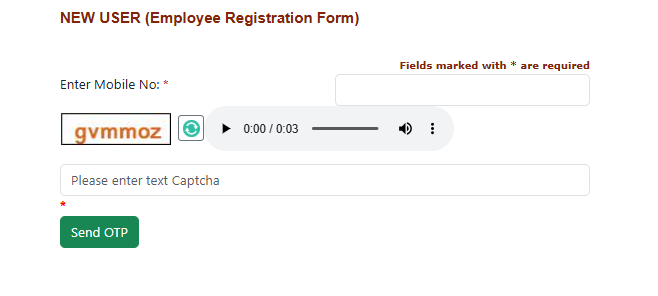
Next, you will be directed to another page, where you need to “Enter Mobile No” and further details.
STEP 3
Complete the verification process and follow the further process. After that, you can log in to your CPWD PIMS account.
What are the Common Features Available on the CPWD PIMS Portal?
The CPWD PIMS portal offers multiple services and tools for employees and administrative staff. There are several features you explore-
Employee Information Management
- Service history
- Transfer records
- Designation details
- Office postings
- Employee identification data
- Departmental records.
Official Orders and Notifications
- Transfer orders
- Promotion notices
- Administrative circulars
- Policy updates
- Office memorandums
- Departmental announcements.
Tender Management System
Users can check:
- Active tenders
- Bid submission details
- Project requirements
- Tender deadlines
- Eligibility criteria
- Contract notices
Read more about CPWD Tenders: 8 Types of CPWD Tenders: How to Apply? | TenderShark
Common Problems Faced During CPWD Login
There are several problems that users face while logging in to the CPWD PIMS-
Incorrect Login Credentials
The biggest and most common issues are entering incorrect usernames or passwords. So, users need to carefully check the spelling, uppercase letters and password format.
Server or Website Downtime
Sometimes the government portals experience temporary maintenance or server load issues. Users need to wait and try again later.
Browser Compatibility Problems
Next, some of the old browsers may not support certain portal functions properly. So you should use updated browsers like Chrome, Edge, or Firefox to generally improve performance.
Password Recovery Issues
Last, most people see an issue while recovering the password because reset links are not working, so you need assistance from their department’s IT or administrative office.
Top Benefits of Using a CPWD PIMS
There are several benefits of using CPWD PIMS-
Faster Access to Information
You can access faster than a manual or physical process and avoid the hassle of an office visit.
Improved Transparency
One of the advantages of using a CPWD PIMS is that ensure transparency. As it reduces confusion and increases accountability in employee management and tender processing.
Better Record Management
You can maintain records digitally that minimize document loss and ease the long term storage.
Time Saving
Next one that both employee and administrative offices and save valuable time through online access and automation.
What is the Role Of Tendershark?
Tendershark is an online tender information and procurement support platform that helps businesses, contractors, suppliers, and MSMEs to search tenders across their city, state, and authority. From NHAI, CPWD, DMRC, MP Tenders, Bihar Tenders or others.
Our platform provides tender alerts, bid notifications, eligibility details, document requirements, and deadline updates, so business can participate in bidding processes more efficiently.
Sum Up
THE CPWD PIMS portal is the official platform for employees, officials, and contractors associated. Whether you want to complete login, employee details, check CPWD order or participate in CPWD tender processes. In this guide, we have explained everything from login, benefits, features and many more. We will bring more such informative guides!
Frequently Asked Questions (FAQs)
Q. Who can access the CPWD PIMS portal?
Ans. The portal is mainly used by the contractors, vendors, engineers, consultants and agencies working with CPWD projects or government construction tenders.
Q. Can joint ventures or companies apply to the CPWD PIMS?
Ans. Yes, individual contractors, partnership firms, LLPs and private or public companies can apply.
Q. Is CPWD PIMS different from CPPP?
Ans. Yes. CPWD PIMS is specifically for CPWD contractors and project management. On the other side, CPPP is a broader government procurement platform for many departments.
Q. How can I renew my CPWD contractor registration?
Ans. You can renew your application online before expiry, and along with updated financial and technical documents.