Managing municipal services used to involve visiting government offices, standing in queues and submitting paperwork for even simple tasks. With the growth of digital governance, many municipal services are now available online, making it easier for citizens to access information, pay taxes and apply for essential services from home.
One such important platform is CDMA, which is associated with municipal administration and urban local body services. People searching for CDMA login, cdma ap login, cdma ap gov in, or CDMA AP ERP Login are generally looking for information about accessing municipal services, payments, applications or department-specific portals.
In this guide, we will explain what CDMA means, how the CDMA system works, what services are available through the Andhra Pradesh municipal administration portal, how to access the CDMA login facility and what users should know about CDMA-related online services. We will also discuss CDMA Telangana and clarify why users may come across different portals while searching for CDMA services.
What is CDMA?
CDMA stands for Commissioner & Director of Municipal Administration. In Andhra Pradesh, the Commissioner & Director of Municipal Administration operates under the Municipal Administration & Urban Development Department and plays an important role in municipal administration and service delivery.
The CDMA system supports digital access to various municipal services provided through Urban Local Bodies (ULBs). Instead of visiting a municipal office for every requirement, citizens can use online platforms to access services related to property tax, water charges, trade licences, land tax and other municipal requirements.
The official Andhra Pradesh CDMA portal provides access to online services and allows citizens to select their Urban Local Body and then choose the service they need. The portal also provides options for online payments and grievance-related services. (Commiss. & Dir. of Mun. Admin.)
What Services Are Available Through CDMA?
The exact services available may depend on the Urban Local Body selected by the citizen. However, the CDMA online ecosystem covers several important municipal functions.
Some commonly available services include:
Property Tax Services
Property owners can use the portal to access several property-related services. Depending on the municipality, these may include checking outstanding dues, self-assessment, property mutation, tax exemption, revision petitions and downloading relevant proceedings.
The portal may also provide a property tax calculator and an option to check the status of an application. This can help property owners manage their municipal tax requirements without making repeated visits to the municipal office.
Water Charges and Water Services
Residents can access services related to water charges and water connections. Depending on the applicable municipal service, users may be able to check dues, make payments or apply for specific water-related services.
Land Tax
CDMA online services can also include services related to Vacant Land Tax (VLT). Users may be able to check their dues, submit self-assessment applications and access other land-tax-related services depending on their ULB.
Trade Licence
Businesses operating within municipal areas may need to use municipal services related to trade licences. The CDMA online system includes trade licence-related services among its municipal service categories.
Birth and Death Registration
Birth and death registration is another important area of municipal administration. The Government Services Portal lists birth certificate services associated with CDMA, Andhra Pradesh, while the CDMA citizen charter also provides information about birth and death registration and certificate services.
Building and Other Municipal Services
Depending on the applicable department and portal, citizens may also find services connected with building permissions, layout permissions, grievances and other urban local body functions.
It is important to note that building and layout approvals in Andhra Pradesh may be handled through dedicated systems such as the APDPMS platform. Therefore, users should always check the official portal specified for the particular service rather than assuming that every municipal service is processed through the same login page.
How to Login on CDMA AP?
To access the CDMA AP citizen login facility, follow these general steps:
- Visit the official CDMA Andhra Pradesh website.
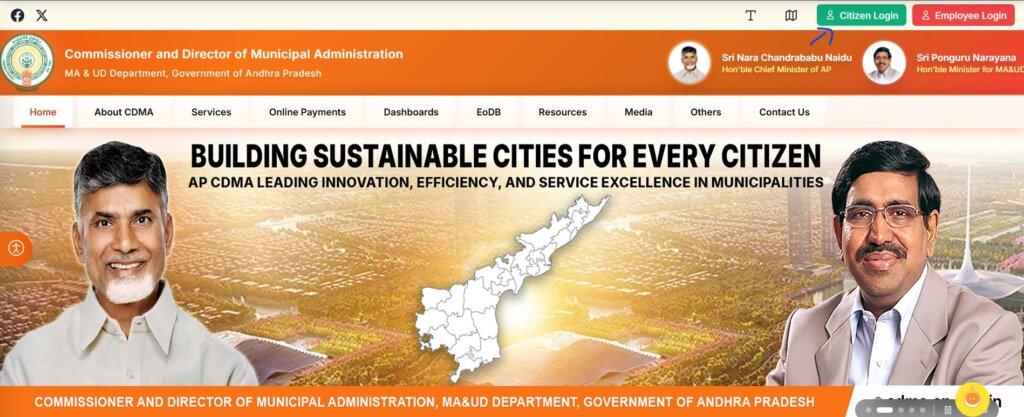
- Look for the Citizen Login option.
- Enter your registered or required mobile number.
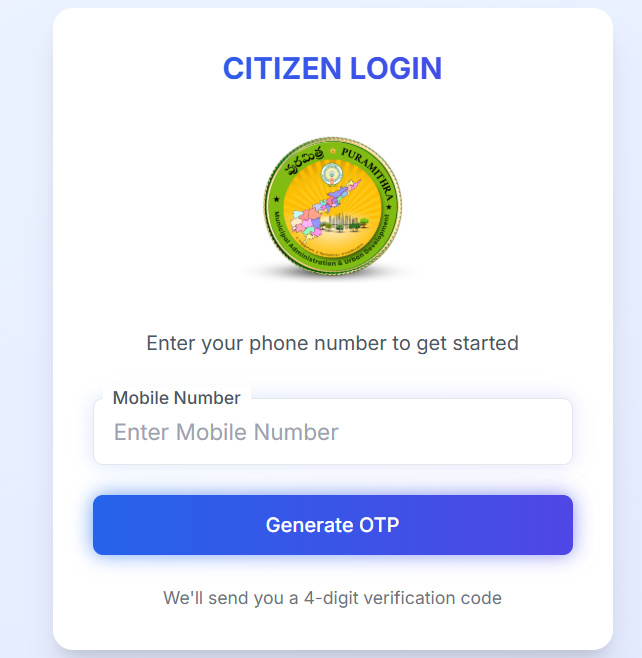
- Select the option to generate an OTP.
- Enter the OTP received on your mobile.
- After successful verification, access the services available through your account or the relevant municipal portal.
Sum Up
CDMA helps citizens access municipal services online, including property tax, water services, land tax and trade licences. Whether you are looking for CDMA AP login, CDMA AP ERP login, cdma ap gov in or CDMA Telangana, always select the correct state and service before logging in.
For the latest portal updates and government tender or Andhra Pradesh Tenders information, visit TenderShark and stay updated with important tenders and procurement opportunities.