The transition from the traditional tendering process to digital procurement is a massive shift. The government, public, and large industry now rely on the e-tendering process. One of the biggest organization in India, Hindustan Petroleum Corporation Limited offer a structured and efficient e-tendering system for vendors, contractors, and suppliers.
If you want to participate in HPCL e-tender bidding or want to work on their projects, it is really crucial to understand the basics. In this guide, we have covered everything from registration and HPCL login to eligibility and the complete bidding process. Without any further delays lets get into it.
What is HPCL E-Tender?
The HPCL e-tender is an online portal where Hindustan Petroleum officially invites bids for multiple projects, including-
- Procurement
- Logistics
- Construction
- Services
In simple terms, this replaces the traditional manual tendering system with the digital process. This makes it more transparent, faster, and accessible across India.
You can find the active HPCL tenders on other trusted platforms like Tendershark, where you can find various types, latest and updates related to the tenders.
Different Types of HPCL Tenders – Understand Each
HPCL regularly releases multiple tenders officially, so lets understand the main HPCL tender types and their work. This will help you understand more about Hindustan Petroleum-
1. HPCL Public Tenders
These are types of open tenders that are accessible to all eligible bidders. Any registered vendors who meet the specific HPCL public tender criteria can bid.
2. HPCL Limited Tender
In this, only selected or pre approved vendors are invited to bid. These are generally restricted and need prior association or approval.
3. HPCL Transportation Tenders
These are specifically for logistics and transportation services, including fuel transport, tanker supply, and related operations.
HPCL Tender Portal – How Does It Work?
The HPCL e-tender portal acts as a centralized system where all activities related to the tenders take place. From downloading documents to submitting bids, everything is handled online.
The registered HPCL tenders portal users can get access to several features like-
- Search for active HPCL tenders
- Download tender documents
- Submit bids online
- Track application status
How to Register in HPCL E-Tender Portal – Step By Step Process
The following are the steps you need to follow to participate in the HPCL e-tender portal-
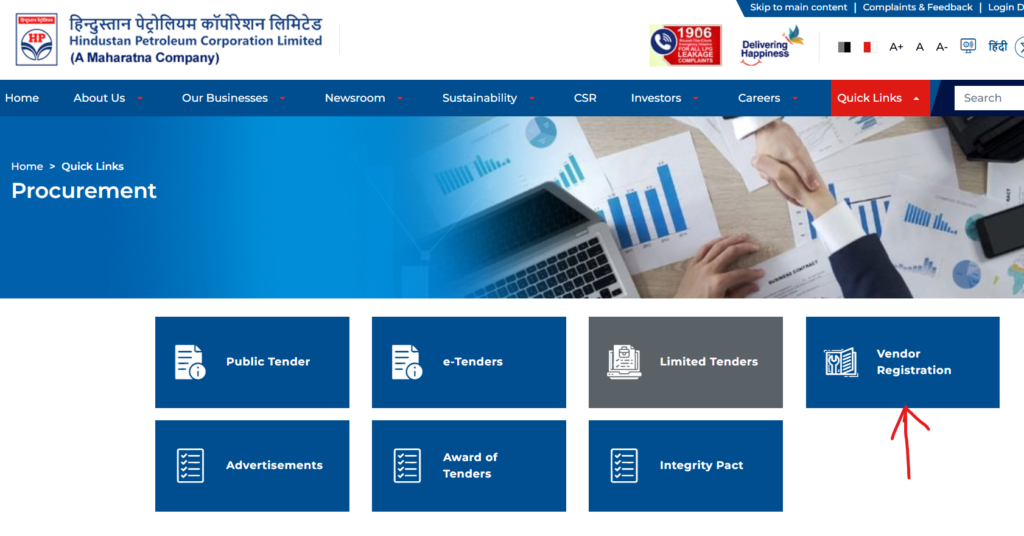
Step 1: Visit the HPCL Tender Portal
Go to the official HPCL tender portal and look for the “Vendor Registration” section.
Step 2: Create an Account
Complete the details to create your account, including company name, email ID, contact number, and business information.
Step 3: Upload Required Documents
Next, upload the required document like-
- PAN card
- GST registration
- Business registration certificate
- Bank details
- Past work experience (if applicable)
Step 4: Digital Signature Certificate (DSC)
A valid DSC is mandatory for participating in HPCL e-tender submissions. It ensures secure and authenticated bidding.
Step 5: Verification and Approval
Once submitted, HPCL reviews your application. After approval, you can proceed with the e tender hpcl login.
How to log in to the HPCL tender portal?
Once you have registered successfully on the HPCL portal, it is time to log in to your account. For that, here are the following steps-
- Visit the HPCL e-tender portal
- Enter your registration details, including username and password
- Use your DSC for authentication (if required)
Eligibility Criteria for HPCL Tenders
Without these details, you will not be able to apply for HPCL tenders. These are the eligibility criteria-
- Valid business registration
- Financial stability and turnover requirements
- Relevant industry experience
- Compliance with technical specifications
- Required certifications and licenses
Important Documents Required For Government Tender Application- Complete Guide | TenderShark
How to Apply for HPCL E-Tender – Bidding Process
The following are the simple steps to participate in the HPCL e-tenders-
1. Search and Select Tender
Browse through the available HPCL public tenders or other categories and select the one relevant to your business.
2. Download Tender Documents
Carefully read all instructions, eligibility criteria, and technical requirements mentioned in the document.
3. Prepare Your Bid
Your bid typically includes:
- Technical proposal
- Financial quotation
- Supporting documents
4. Upload Documents
Submit all required files through the hpcl e tender portal before the deadline.
5. Submit the Bid
Use your DSC to finalize the submission. Late submissions are not accepted.
6. Track Status
After submission, you can track updates directly through your dashboard.
The Common Challenges and How to Solve Them
Many new users face issues while using the e-tender HPCL login system. So the following problems, along with their solution-
- Login Issue: Make sure you use the correct credentials and DSC installation.
- Document Uploading Errors: If you face difficulty or errors while uploading documents, then check the file size and format and ensure it matches the criteria.
- Missed Deadlines: Always track the timelines and submit early. You can set a reminder in case of your busy schedule and submit early.
- Technical Errors: If you specifically face issues technically, then try to use a compatible browser and a stable internet connection.
Sum Up
Participating in the HPCL e-tender is a great opportunity for businesses to work with a leading public sector company in India. In this guide, you have discovered from HPCL public tenders, limited tenders to any other category that could offer potential projects in which you can participate and bid. By simply following these easy steps, you will be able to log in to the HPCL portal, register, and get more access.